
WordPress analytics
Cookieless analytics for WordPress, the official plugin.
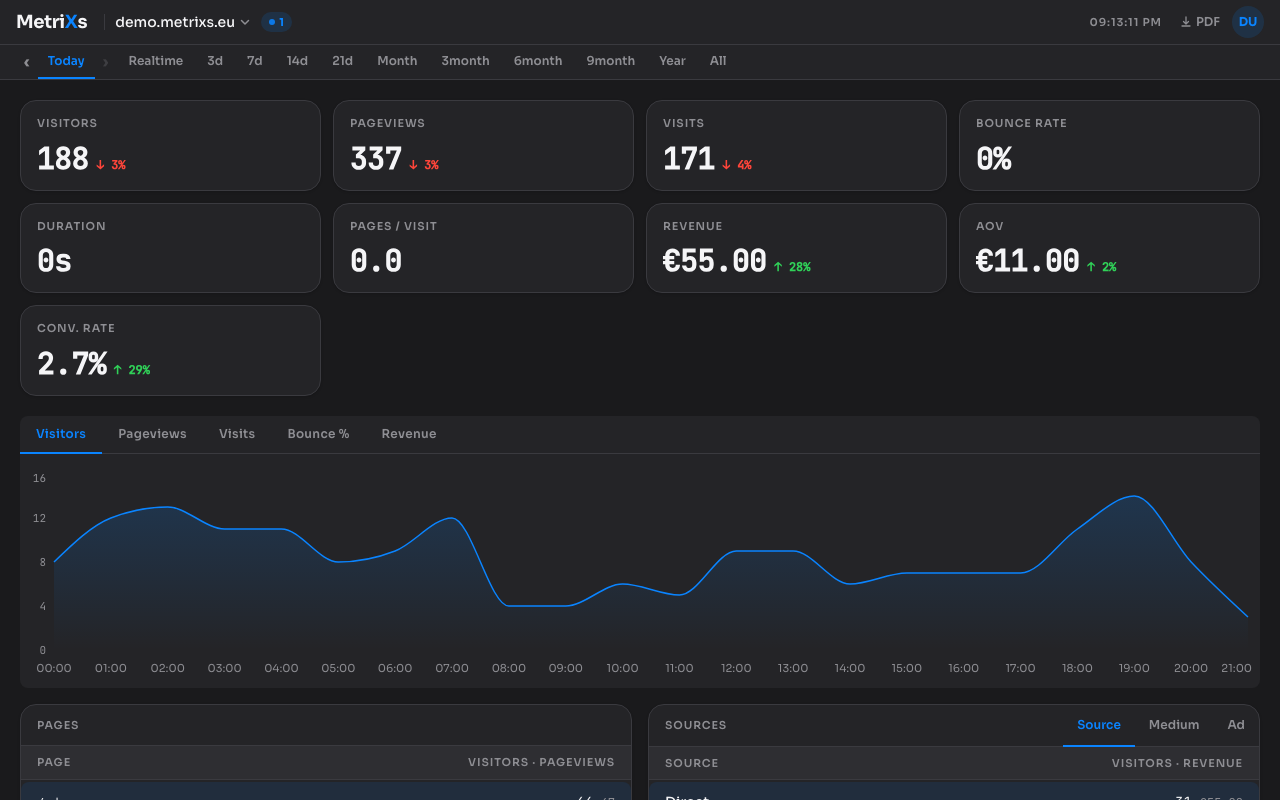
MetriXs for WordPress is the official WordPress analytics plugin from MetriXs. Install it from the WordPress plugin directory, connect it to your MetriXs account, and get visitors, pageviews, sources, geography, and devices in one clean dashboard. No cookies, no consent banner, GDPR compliant by design, hosted in the EU. Tracking is opt-in and off until you turn it on.
Why WordPress sites choose cookieless analytics
Most WordPress analytics setups end the same way: a Google Analytics plugin, a cookie banner plugin, and a consent screen that stands between your visitors and your site. Google Analytics sets cookies, so in the EU it needs valid consent before it may load. That means a banner, a consent platform, and a share of visitors who click "reject all" and never show up in your numbers.
MetriXs takes a different approach. It sets no cookies and stores no personal data or persistent identifiers, so no consent banner is required under the ePrivacy Directive and GDPR cookie rules. Your visitors browse without a pop-up, and your stats stay complete.
What the plugin does
MX Cookieless Analytics is the official MetriXs plugin for WordPress, published in the WordPress plugin directory. After a one-minute setup it adds the MetriXs tracker to your pages and verifies your site automatically.
Tracking is strictly opt-in. Activating the plugin loads nothing and sends nothing: the tracker only starts after you paste your site API key, click "Connect & verify site", and enable tracking. You can pause it at any time with one click.
Inside the plugin you can exclude all logged-in visitors or specific roles, so your own edits and preview visits never pollute your stats. Administrators are excluded by default.
MX Cookieless Analytics vs. Google Analytics on WordPress
| MetriXs plugin | Google Analytics (via a plugin) | |
|---|---|---|
| Cookies | None | Yes (_ga, _gid) |
| Cookie banner required | No | Yes, in the EU/UK |
| Consent management platform | Not needed | Needed |
| Site verification | Automatic, in the plugin | Property setup + tagging |
| IP addresses stored | No (daily-salted hash) | Collected by GA |
| Data location | EU (Germany) | US by default |
| WooCommerce revenue | Built in, server-side | Via e-commerce add-ons |
| Script size | Small, single script | ~50 KB+ (gtag.js) |
| Price | Free plan, paid from €6/mo | Free (GA paid tier $50k+/yr) |
Why MetriXs fits WordPress sites
No cookie banner, ever
No cookies means no consent banner, no consent management platform, and no "reject all" losses in your data. The plugin is GDPR friendly by architecture, not by configuration.
WooCommerce revenue included
Enable the WooCommerce option and the dashboard shows revenue, average order value, conversion rate, a checkout funnel, and top products. Events are sent server-side, so redirect-based payment methods such as iDEAL are captured.
Light and cache friendly
The tracker is a single small script loaded from app.metrixs.eu, so page caching and optimization plugins do not break it. Your site stays fast.
How to set up MetriXs on WordPress
From plugin install to live dashboard takes about five minutes. No theme files, no consent banner.
01
Create your MetriXs account
Sign up at app.metrixs.eu and add your WordPress site. The free plan covers 5k pageviews/mo, no credit card.
02
Install the plugin
In WordPress, go to Plugins → Add New and search for "MX Cookieless Analytics", or grab it from the WordPress plugin directory. Install and activate. Nothing is loaded or sent yet.
03
Connect and verify
Create a site API key in the MetriXs dashboard (Settings → Sites → API keys), paste it into Settings → MX Cookieless Analytics, enable tracking, and click "Connect & verify site". Verification is automatic.
04
Turn on WooCommerce (optional)
Enable the WooCommerce option to track checkout, payment, and order events server-side, with revenue, AOV, conversion rate, funnel, and top products in your dashboard.
What about other WordPress analytics plugins?
The WordPress plugin directory has several analytics options: plugins that pipe your data into Google Analytics (which brings the cookie banner and consent platform back), lightweight self-host-style plugins you run on your own server, and hosted services. MX Cookieless Analytics is the hosted option with the least overhead: cookieless by design, verified automatically, with WooCommerce revenue built in and all data in the EU.
Add cookieless analytics to your WordPress site today
Free plan, no credit card. Install the official plugin, connect it, and your dashboard is live in minutes. No cookie banner, no bloat.
Start free trial →Frequently asked questions
- Is the MetriXs WordPress plugin free?
- The plugin itself is free and open to everyone in the WordPress plugin directory. MetriXs the service has a free-forever plan (1 website, 5k pageviews/month, 1 month retention) with no credit card. Paid plans with longer retention, more sites, and team features start at €6/month.
- Do I still need a cookie banner?
- No. MetriXs sets no cookies and stores no personal data or persistent identifiers, so no consent is required under the ePrivacy Directive and GDPR cookie rules. If you remove Google Analytics and other cookie-setting scripts, the banner can go entirely.
- Does the plugin track visitors by default?
- No, and that is deliberate. Activating the plugin loads nothing and sends nothing. Tracking starts only after you paste your API key, click "Connect & verify site", and enable tracking in the settings. You can pause it any time with one click.
- Does it work with WooCommerce?
- Yes. Enable the WooCommerce option in the plugin settings and checkout, payment, and order events are sent server-side, so redirect-based payment methods such as iDEAL and bank transfers are captured. The dashboard shows revenue, average order value, conversion rate, a checkout funnel, and top products.
- Does it work with caching and optimization plugins?
- Yes. The tracker is a single small script served from app.metrixs.eu, so full-page caching, minification, and optimization plugins do not interfere with it. Your pages stay cacheable and fast.
Related